Import your suppliers' product listings
10 minutes per listing, dozens of products per delivery: whole days lost retyping invoices.
Import the supplier invoice: your listings build themselves, complete, in a minute.
You get back your time, your money — and your evenings.
Start for free, no account required
Works with 4 e-commerce platforms and Claude
One product listing, everywhere you sell
 Shopify
 Square
 WooCommerce
 PrestaShop
 Claude
From invoice to product page
One invoice line. One complete product page.
On your supplier's invoice, a product fits on a single line: a reference, a shortened name, sizes, a quantity. Refect finds the original product page at the brand and brings it back complete, in about 30 seconds per product.
- The brand's photos, in the right colour
- Every size and colour, organised as variants
- Description, material, category: nothing to write
You check it, you publish it.
Supplier invoice · Élan
ELAN-TS-AERO · AERO T-SHIRT WHITE · S-XL · ×8 · €18.50
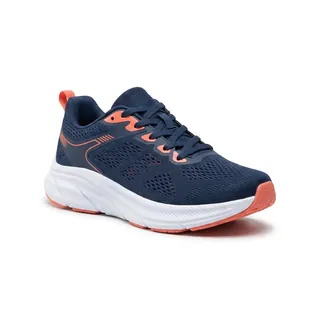
ELAN-TP3-MC · TEMPO 3 NAVY/CORAL · SIZES 39-45 · ×6 · €62.00
ELAN-CH-RUN · RUN LOW SOCKS · 39-46 · ×24 · €4.90
Product page

 Verified
Élan Tempo 3 · Road running shoe
- Colour
- Navy / CoralChecked
- Sizes
- 39404142434445Checked
- Description
- Light and responsive, the Tempo 3 cushions every stride with its thick foam. Its recycled mesh breathes on long runs.
- Category
- Shoes › Running › RoadChecked
With every delivery
Restocking takes care of itself.
The next invoice arrives. Refect recognises the products already online by their reference and updates their stock, without creating duplicates. Only genuinely new items become new product pages.
- Stock updated on your online store and your till
- No duplicates: every recognised product keeps its page
- The whole delivery handled in about 5 minutes
Supplier invoice · Élan · October
- Élan Tempo 3×6
- Aéro T-shirt×12
- Run Low socks×24
- Aéro cap×10
Already online · stock updated
- Élan Tempo 3+6
 Aéro T-shirt+12
 Run Low socks+24
New · page created
 Aéro capNew
3
stocks updated
1
page created
0
duplicates
Verified reviews
5.0 stars on Google

Adrien Isidore
Local Guide · 1 month ago
The solution is quick to set up and efficient. I recommend it.

Yvann Barbot
2 months ago
Very friendly and professional founder, I'm very satisfied with my experience.

Hugo Ganet
2 months ago
Top notch! I saved several hours a week, Gregoire is very friendly, I recommend it :)
Refect pricing - plans for Shopify and Square
Start free with 25 credits, no commitment, then increase quotas when you need them
Free, No Commitment
25 free credits to try Refect on your next invoice.
- 25 free credits
- Invoice import: photo, PDF or Excel
- Product pages found at the brand and verified
0€/month
Essential
For independent stores
59€/month
- 1000 credits per month
- Product pages found at the brand and verified
- Automatic restocking, no duplicates
- Publishing to Shopify, PrestaShop, WooCommerce or Square
- Bulk image editing
- Writing style per category, SEO fields and Google categories
- Email support
Pro
For stores receiving deliveries every week
179€/month
- Everything in Essential +
- 3000 credits per month
- The Refect agent: edit your product pages by talking to it
- A whole invoice fixed in a single request
- Priority support
Team
For multi-store retailers
449€/month
- Everything in Pro +
- 7500 credits per month
- Connection to your till or ERP: FastMag, Lundi Matin, others on request
- Dedicated setup support
- Direct line
Credits are used according to the work done on each product page: reading the invoice, searching the brand's site, verification, image editing.
Prices are shown in the configured billing currency.
Frequently Asked Questions
In short: Refect connects to 4 platforms, processes an invoice in about 5 minutes and never makes up information. Here are the answers to the questions we get most.
Which tools does Refect work with?
Refect connects directly to 4 platforms: Shopify, PrestaShop, WooCommerce and Square. On the till and ERP side, it works with FastMag and Lundi Matin, and we set up the connection on request for other software: just tell us which one you use.
How does Refect work?
You import your supplier's invoice. Refect reads every line, finds the product's original page at the brand or supplier, then checks it is the right item (reference, colour, sizes) before filling in your product page. You no longer type your product pages, and you barely need to check them: everything is designed to make the system as autonomous as possible.
Does Refect make up descriptions or information?
No. Refect generates no information: everything comes from existing, reliable sources such as the brand's website, the supplier's catalogue or your invoice. Data we cannot find is never made up.
How is it different from ChatGPT or my store's built-in AI?
Those tools write from whatever you give them, and can be confidently wrong. Refect fetches the product's real page, then checks it. You get the brand's photos, the right variants and accurate information.
What happens when I receive a restock?
Refect recognises the products already online by their reference and updates their stock, without creating duplicates. Only new items become new product pages.
How long does an invoice take?
About 5 minutes per invoice: that is the median time measured on 45 invoices processed between September and October 2026, roughly 30 seconds per product. You can do something else in the meantime.
Will my products be more visible on Google?
Yes. Refect fills in what Google and AI assistants use to recognise a product: the brand, the category, the barcode number (printed under the bars on the label) and the photos. Complete product pages rank better in searches.
Can I try it for free?
Yes. The free plan includes 25 credits to try Refect on a few products, with no commitment. You can also book a demo.
Useful pages
E-commerce best practices, written for independent retailers.
 Shopify Product Listing Automation: The Complete 2026 Guide
Full workflow, real time savings (30 sec per photo, 20 sec extraction), copy-paste prompts and SEO strategy to rank your Shopify listings.
Shopify Product Listing Automation: The Complete 2026 Guide
Full workflow, real time savings (30 sec per photo, 20 sec extraction), copy-paste prompts and SEO strategy to rank your Shopify listings.
 Product Listing Automation: The Complete 2026 Guide
Complete workflow, real time-saving calculations, copy-paste prompts, and SEO + GEO strategy to aim for the first position.
Product Listing Automation: The Complete 2026 Guide
Complete workflow, real time-saving calculations, copy-paste prompts, and SEO + GEO strategy to aim for the first position.
 How to create better Square product listings - invoices, photos and product data
Supplier invoices, consistent photos, barcodes and complete listings: the flow to sell online with Square.
How to create better Square product listings - invoices, photos and product data
Supplier invoices, consistent photos, barcodes and complete listings: the flow to sell online with Square.
 How to Start Your Store in 2026 - What Nobody Really Tells You
Digitize your stock early, cut repetitive tasks, launch your e-commerce channel: practical advice from real store workflows.
How to Start Your Store in 2026 - What Nobody Really Tells You
Digitize your stock early, cut repetitive tasks, launch your e-commerce channel: practical advice from real store workflows.
Ready to get your time back?
Book 20 minutes: bring an invoice, leave with your listings created.